Wednesday, July 13, 2011

Move Your Facebook Albums To Google+


Google+ is getting popular day by day. Although it is on the trial phase, millions of users are using it and seems it will be a hit. The users in the Google+ are those who either use Facebook or those who left Facebook to stick with Google+. Theres a good news for people who use both facebook and Google+. They can now move their photo albums from facebook to Google+.

An app named move2picasa lets you to transfer all your photos from Facebook to Picasa. Then after transferring all your pics from Facebook to picasa, you can easily share them with your circle on Google+. Move2picassa is currently available on chrome webstore and you can install it as an extension on Google Chrome. Obvious to say, its available on Google Chrome only.After installing you can click on the icon appearing on the right side of the address bar to start transferring your photo albums from FB to the Picasa account you are currently logged into. It has limitation too. You can either transfer all your photos or none. 


The app was very popular and saw over 10,000 users putting photo movement request. Developer Jain said "I did not think it will get such a response. We moved 4 lakh photos which took up lot of resources. We have a long request queue waiting, so we have temporarily paused accepting requests". 

Wednesday, July 13, 2011 by Mohit Baskota · 2

Tuesday, July 12, 2011

Liberate Your Data From Google - Google Takeout.


Do you know that you can take your data out from the Google whenever you want? You can easily take out your data from various services of Google with the help of the feature called Google Takeout. This feature is possible because of The Data Liberation Front.It is an engineering team at Google whose singular goal is to make it easier for users to move their data in and out of Google products.

It is a great service provided by Google which you can access by loging in  with your Gmail username and password. Click here to try Google Takeout. After signing in you can then easily take your data out of several Google services. It supports Buzz, Contacts and Circles, Picasa Web Albums, Profile and Stream, but Google promises support for more services and products later on.Once you recover your data then you are able to save it in open formats so that you can import and use it with other services.

Google Takeout is a great service which enables you to take your data with you whenever you like and also use it with other services. Google with this feature might want send a message how much they care about the user data and privacy. This might be a plus point for google to keep its new product Google+ a way step ahead than Facebook.

If you want to liberate your data using Google accounts rather than www.google.com/takeout, then go to the account settings tab. There you will see DATA LIBERATION option.Click there and choose a service or download all of your data as per your wish. 

See the video to know about Data Liberation Front.


Tuesday, July 12, 2011 by Mohit Baskota · 0

Sunday, July 10, 2011

Google+ Sent Spam Notifications to users. Google says “We ran out of disk space”

Google+ bombarded spam notifications to the users due to a bug. Many of the Google+ got users got massive notifications today. This may have affected different users differently. I got about 55 notification email filed under a single conversation thread,but many of my friends say they didn't received any kind of such emails.

Vic Gundotra, Senior Vice-President of Social for Google, on his official Google+ page posted 

"Please accept our apologies for the spam we caused this afternoon.


For about 80 minutes we ran out of disk space on the service that keeps track of notifications. Hence our system continued to try sending notifications. Over, and over again. Yikes.


We didn't expect to hit these high thresholds so quickly, but we should have.


Thank you for helping us during this field trial, and once again, we are very sorry for the spam."


It's pretty embarrassing for Google+ to suffer from such a bug - you can hardly imagine how the site could conceivably "run out of disk space", even if it is still technically undergoing trials.

But we’ll likely see even more issues than normal arise from Google+, since its “field trial” status — which has led Google to limit participation in the service so that it can see how Google+ handles the initial stampede of traffic — seems to indicate that it may be even less mature than a typical Google beta test.
For a field test though, Google+ seems to be off to a good start. It’s been the most buzzed about tech topic since it was announced last week, and former Google CEO Eric Schmidt also recently said that it has millions of users (not that that’s a huge surprise).

Sunday, July 10, 2011 by Mohit Baskota · 1

Another Scam Spreads on Facebook.This Time In The Name Of Video Calling[BE CAREFUL!]

Scams are no new to Facebook. Once the other day Facebook walls are filled with various spams. Sometimes with the titles somewhat like " SEE WHAT THAT PARENT DID AFTER SEEING THAT VIDEO" or other time "YOU NEVER IMAGINED THIS", scams spread out on the Social giant Facebook. Facebook, with no doubt has been heaven for scammers. This time a scam has taken over Facebook in the name of Facebook new feature Video Calling.

Its been few days since Facebook launched its most talked feature Video Calling. But with the launch of that features, scammers are teaming up to trick you into spamming all your Facebook friends, using the lure of the new video calling feature. Most people got lucky and installed video calling on facebook. But many are still unable to install it. Its a warning to all of you, those whose haven't been able to install facebook video calling, don't be the victim of such spams.  Facebook Video Calling not supported on Linux and Chromium, and those users unable to install it can click in the links and may be the victim of spam.


For installing Facebook video calling please follow official Facebook page here.

The scam comes to you in the form of a wall post, enticing you to “Enable video calls". But naked security strongly suggests you not to click on the links. Naked security also shared the following images.


According to mashable "If you do click on that bogus message, it asks for access to your basic information, wants to post to your wall, to access your posts in your news feed and access your data at any time.

What does it do then? It doesn’t let you video chat at all, but simply tries to get you to fill out surveys so its evil creators can collect referral fees. Worse, it exposes your friends to the same trick. Don’t click those fake links. If you want the actual Facebook Video Calling, it’s available now for some users but not others, and you haven’t already been granted access, you will be soon."

by Mohit Baskota · 0

Saturday, July 9, 2011

NEPAL VS JORDAN. Venue Still Undecided For Home match.

Dashrath Stadium, Nepal
The enthusiasm of Nepali Football fan in the match between Nepal and East Timor  was animated. Thousand of supporters poured into Dashrath Stadium to support Nepal. The world cup qualifiers matches are being held on Home and Away basis. Since East Timor don't have a stadium, Both Home and Away matches were played in Nepal. 

But The venue for Nepal´s home match against Jordan in the 2014 World Cup Asian Qualifiers second round is still undecided even though schedules in the official website of the Asian Football Confederation (the-afc.com) shows the match would be held in the Dasharath Stadium, Kathmandu.

Indra Man Tuladhar ,CEO .All Nepal Football Association (ANFA) said “We are still undecided about hosting the home match against Jordan in Kathmandu since we are facing the problem of ground maintenance" Tuladhar added "As the Martyrs Memorial League is going on, we still have ground problem despite our interest to host the home match"

Previously, ANFA had asked to play both Home and Away match at Jordan. But after the matches with East Timor getting massive response from Fans, ANFA is in tremendous pressure to host the home match. Meanwhile ANFA is doing homework to host the match against Jordan. ANFA spokesman Lalit Krishna Shrestha says "We are discussing about the preparation of the national team and managing the ongoing league simultaneously but we are undecided yet,"

Amman International Stadium, Jordan.
Meanwhile, Graham Roberts has said that he will make sure home match against Jordan will be played in Kathmandu. Speaking after post match conference after defeating Timor Leste 5-0 in the second match of first round matches of 2014 World Cup Asian Qualifiers, he said, "I will do everything possible to make sure we are playing our home match at home. You should not hurt thousands of Nepalese football fans."

Lets hope we can support NEPALI FOOTBALL TEAM .

Nepal's Away match will be Played at Amman Interbational stadium at Jordan which has the capacity of 25,000 suppoters.

Saturday, July 9, 2011 by Mohit Baskota · 0

Nepal To Take On Jordan For FIFA World Cup Qualifiers 2nd Round


NepalVS Jordan
Sat23/07/11Jordan
Nepal
Thu28/07/11Nepal-Jordan
The morale of Nepali Football Team is high after thrashing East-Timor 7-1 at Dashrath Stadium in FIFA world cup qualifiers 1st Round. Now with the winning spirit Nepali Team is all set for the 2nd round games. Nepal is all set to play against Jordan in the second round on July 23 and 28. Jordan, ranked 83rd in the FIFA ranking currently, is two times (2004 and 2011)quarter finalists in AFC Asian Cup. 

Comparing Nepal's ( FIFA ranking 148) and Jordan's historical background,Jordan seems to be stronger with stats. But Nepali Coach Graham Roberts thinks other way.He believes that Nepal can beat Jordan. When asked if Nepal can beat Jordan, Roberts said,"Why not! We can beat them. We are confident and will do everything possible in the second round qualifiers"

 Jordan and Nepal are playing against each other for the first time. Jordan might be a tough call for Nepal but one thing common in both teams is they have lost only one match played in last seven matches.


Fifa ranking
Nepal 148 vs Jordan 83

Highest Ranking
Nepal 124 (Dec 1993) vs Jordan 37 (July 2004)

Lowest ranking
Nepal 188 (Feb 2008) vs Jordan 152 (July 1998)

Football governing body
All Nepal Football Association (ANFA)
Jordan Football Association (JFA)

World Cup Appearances
Nepal: never qualified
Jordan: never qualified

Asia Cup Appearances
Nepal: never qualified
Jordan: 2004 and 2011. Quarter finalist both times.

Nepal: Last seven matches
W W D L W W W
Oppnents
East Timor (twice), Sri Lanka, Korea DPR, Afghanitan, Bhutan (twice)

Jordan Last seven matches
D D L W W D D
Opponents
Korea DPR, Kuwait, Uzbekistan, Syria, Saudi Arabia, Japan, Uzbekistan

Coach
Nepal: Graham Roberts, Former England International
Jordan: Adnan Hamad, Former Iraq International

Biggest Win
Nepal 7-0 Bhutan (1999)
Jordan Macau 13-0 (2006)

Biggest defeat
Nepal 0-16 South Korea Nepal (2003)
Jordan 0-6 China (1984)

National Stadium
Dasharath Rangashala Stadium 15,000
Amman International Stadium 25,000

Kit Provider

Nepal: Adidas
Jordan: Adidas

Jersey

Home
Nepal: Red
Jordan: White

Away
Nepal: Blue
Jordan: Red

(stat source: goalnepal.com)

by Mohit Baskota · 2

Friday, July 8, 2011

Finally,Facebook Stream Can Be Viewed On Google+

Finally, now you can view your Facebook stream inside Google+ with an extension called GOOGLE+FACEBOOK. This application was godsend to me as I was irritated managing many social networking sites. Previously, I had linked my twitter and Facebook account in order to manage both of them easily. But after the arrival of Google+, I desperately needed an extension to link Google+ and Facebook.

In order to see your Facebook steam inside Google+, you need to install  an extension 'GOOGLE+FACEBOOK'. Click here to install the extension. After the easy one click installation you can see a little facebook icon on your Google+ homepage. Clicking on that icon you will be able to see all your facebook stream right there on Google+. Moreover you can update your facebook status from Google+ itself. Sounds Cool ! isn't it? According to developers, the extension was created in 1 day using crossrider. Google Chrome and Firefox easily supports the extension but IE doesn't support it due to https:// security level issues.

I linked my Google+ with Facebook. See how it looks.

Friday, July 8, 2011 by Mohit Baskota · 0

The First Video Ever to be Uploaded On YouTube. "Me At The Zoo"


Me at the zoo is the first video ever to be uploaded to YouTube. It was uploaded at 8:27 pm on Saturday, April 23, 2005 by Jawed Karim, one of the co-founders of the site, under the username "jawed".Described by The Observer as "poor-quality", the video was shot by Yakov Lapitsky at the San Diego Zoo; it features Karim in front of the elephants, explaining how interesting their "really, really, really long trunks" are, and is 19 seconds long.
The Los Angeles Times states: "as the first video uploaded to YouTube, it played a pivotal role in fundamentally altering how people consumed media and helped usher in a golden era of the 60-second video." As of June 2011, the video had received over 5 million views.
(source : wikipedia.org )


by Mohit Baskota · 0

Thursday, July 7, 2011

Facebook Video Calling Not Supported On Linux and Chromium

As soon as the Facebook's new feature video calling was out, I thought of giving it a try. I tried to install video calling in my Chromium browser. But I was unable to install the video chat on chromium.It displayed me the message " We are sorry ! video calling is not available in this browser.Please try again with another browser."


After going to video calling page on Facebook, I figured out Chromium is not supported by it. Instead i have to install Google Chrome. So i installed Google chrome on my system. Here is the list of browsers supporting video calling.


Installing chrome was also not helpful to me. Again I found out the problem is that I was on linux system. Currently video calling is not available on linux system. :(
I haven't found other ways of installing video chat on linux system. If I find one I will surely share it over here.

Thursday, July 7, 2011 by Mohit Baskota · 6

Facebook Launches 'Awesome'. Now Video Calling On Facebook Possible

With the launch of Google+ , a new feature called HANGOUT became really popular. This is the main feature that makes G+ different than Facebook. As soon as search engine giant Google launched G+,so called 'FACEBOOK KILLER', people started saying it seems to be way cooler than Facebook. With the features like HANGOUT ,Sparks,circle etc G+ can be called as the COMBO for Facebook and Twitter.

To overcome the buzz of Hangout,Social Networking Giant Facebook launched its most talked ‘awesome’ Video Chat powered by Skype on Wednesday.At the company’s Palo Alto, California, headquarters on Wednesday, Facebook CEO Mark Zuckerberg announced the launch of Video Chat on Facebook in collaboration with Skype.

This announcement also brought the attention back to Facebook, after Google Inc. has hogged the social media spotlight for the last week with Google+. The thing to note is that facebook chat is different than G+'s Hangout. You cannot have group chat on Facebook as on G+. Only one to one video calling is allowed in Facebook.

Zuckerberg stated that with 750 million active users with Facebook, it will be a great boost for the skype. Let me remind you that Skype which was recently bought by Microsoft corporation. In its blog Facebook wrote, “A few months ago, we started working with Skype to bring video calling to Facebook. We built it right into chat, so all your conversations start from the same place. To call your friend, just click the video call button at the top of your chat window.” 
Haven't installed video chat yet on your Facebook. Click here to install video calling on Facebook.
Video Calling still doesn't support various browsers and Linux platform. Click here to read more.

by Mohit Baskota · 0

Wednesday, July 6, 2011

NTC To Launch A Social Networking Site Chautari.

With Facebook and Google fighting with each other to be the King of social networking, Nepal Telecom has announced to launch a Social Networking site 'CHAUTARI.'  Currently, when logged to http://chautari.ntc.net.np/ it says 'Website is under Construction'. But according to Saroj Kumar Shakya,  Nepal telecom's deputy manager at Information and Technology directorate , Chautari is currently in the phase of internal testing and will go online soon. Its server will itself be in Nepal and all the contents has been prepared in Nepal.The site is same as the Facebook with chat , groups ,photo sharing etc. It can have the capacity of 1  million users at the starting and will be extended as per the need. NTC mobile subscribers will be able to send free sms through the site. Although there will be the limitation of 10 messages per day.

Many websites quote "NTC to compete with facebook." But I personally  don't think thats the case. With search giant Google and Social King Facebook trying to be no 1, theres no way NTC can even think competing with either Facebook or Google Plus. But if Chautari is good enough to use then one cannot doubt its popularity in Nepal.

We should take this action of NTC as positive step towards establishing Nepal in a social networking platform.But the question is Was this really necessary? 
Here are some of my personal feelings on chautari. 
  • NTC should have focussed on improving the current telecom services rather than launching a "so called" social networking site.
  • Mobile services are not good enough and internet services provided are creepy too. If this is the way with chautari, i guess it will get down for maintenance or crash numerous times. 
  • On the positive side, I think this is a good initiative shown by them to initiate social networking within Nepal using Nepali experts. If they work hard on fixing current issues on telecom sector and maintain chautari well, then there is no doubt in success of chautari. GOOD LUCK NTC !

How do u feel about Nepal Telecom launching its own social networking site without focusing to solve the existing issues in telecom sector.Feel free to post your feelings about CHAUTARI on the comment section.

    Wednesday, July 6, 2011 by Mohit Baskota · 8

    Tuesday, July 5, 2011

    Things To Do After Fresh Installation Of Ububtu For Beginners

    This is my first post on this series. In this post I will be writing about some basic configurations you need to do after installing ubuntu. I will also be writing on some of the basic application 
    to install after the fresh installation of ubuntu.

    After installing Ubuntu, beginners bang their head and say " Where to start with?". Installing ubuntu is not a big deal. It is only the first step. The ubuntu you installed is raw. You should configure it to use it the way you want. Here are simple but important things you must perform after the fresh installation of Ubuntu.


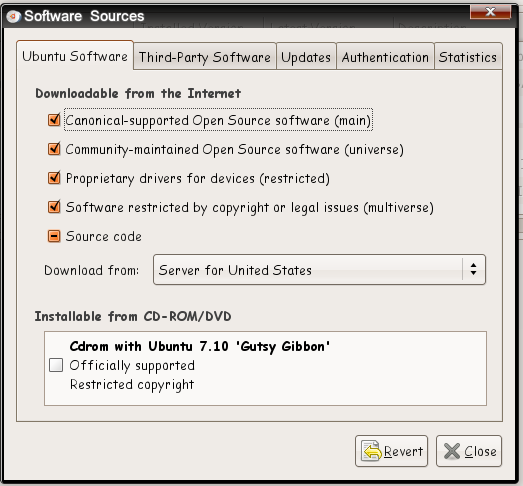
    Enable the repositories


    Every time I do a fresh install of Ubuntu, the first thing that I do is to enable the universe, multiverse,backport and Canonical’s ‘partner’ repositories. These repositories open up new application choices and allows you to install popular third party software easily and quickly.


    Go to System -> Administration -> Synaptic Package Manager.
    Click on Settings -> Repositories.
    Checked all the boxes.

    Update Repositories
    • Goto System - Administration - Synaptic Package Manager and hit 'Reload' button OR simply do the following in Terminal.
    • sudo apt-get update && sudo apt-get upgrade
    Ubuntu-Restricted-extras
    Can’t listen to MP3? Can’t watch Youtube video? Can’t run Java? Don’t worry, all you need to do is to install the ubuntu-restricted-extras package and it will install all the necessary files/codecs for you. Some common applications in the package include MP3 codec, Adobe Flash player, Java runtime and Microsoft core fonts.
    sudo apt-get install ubuntu-restricted-extras
    Check For Availability of Proprietary Hardware Drivers
    • In my case, all the hardware drivers including graphics and wireless drivers were enabled automatically. But this may not be the case with everyone. 


    • If you are on the other side, simply goto System - Administration - Hardware Drivers and check whether if there are any drivers available and activate the ones you want. 
    Install Compiz Config Settings Manager

    Compiz desktop effects are available in your Ubuntu by default and if you have any kind of 3D acceleration available(graphics driver ie), you are good to go with Compiz. 


    sudo apt-get install compizconfig-setting-manager


    Install VLC Media Player
    VLC media player is arguably the most comprehensive multimedia application available for Ubuntu. It is fast and has support for almost all multimedia formats.

    sudo apt-get install vlc
    These are some of application I add or changes I make after installing a fresh copy of ubuntu. This dosen't mean that this should be always done the same way. This is my personal choice and may differ to person to person. I will be writing on more application to install in my upcoming posts.

    Tuesday, July 5, 2011 by Mohit Baskota · 0

    Solve Problems For Money With Google

    This month seems to be busy for Google. It launched all sorts of its products with Google+ being the most talked one. But other than Google+, "What Do You Love?" and Google+ button were also launched this month. With G+ getting all the hype this products are not being talked much.  

    Now again, after the quiet launch of "What Do You Love?", Google has quietly  launched a social contest website called Prizes.org. The web site is operated by a company called Slide. It is the same social gaming company which Google acquired last year. Prizes.org allows users to create “contests” where they post questions or tasks. The user can then award a cash prize to the best answer received. 

    In the home page, prizes.org says: 
    "Post a task or question, offer a prize and let the crowd help you out!"
    "Win real money by entering a contest. Receive votes for your entry and win big!"
    "Contest creator will receive the work they asked for and winner will take home cash!"

    Users may ask for wedding assistance, plan a adventure, best product for infants, etc. Each post contains a time allotment for forum feedback, during which time visitors vote on the best advice submitted. The user who gains the most votes wins the cash, often a $10 to $50 prize. At the moment you can sign up for prizes.org using either facebook or twitter account. The site directly don't claim it as Google product but if u go through the privacy policy you can find this:


    Prizes.org is offered by Slide (part of Google Inc., located at 1600 Amphitheatre Parkway, Mountain View, CA, USA).


    Enhanced by Zemanta

    by Mohit Baskota · 0

    Tuesday, June 28, 2011

    Nepal VS Timor-Leste ( Fifa World Cup 2014 qualifying round )


    WE SUPPORT NEPAL 

                                                              
    Nepali national football team is ready for the clash between East Timor for the FIFA World Cup Qualifiers.The matches are to be held on Wednesday and Saturday.Nepali national team coach Grahm Roberts is in no mood to take low  profile East Timor lightly. East timor is currently ranked in 200th position in FIFA ranking while Nepal lies at 147th position.


    "We will treat East Timor the same way we did North Korea and other teams during the AFC Challenge Cup qualifiers," Coach Roberts said during a press conference in the capital on Monday. "We will win every match."Roberts had guided Nepali team to the final rounds of Challenge Cup on April, finishing as runner-up of group D.


    (image src: ekantipur.com) 
    The winner among them will play against Jordan on July 23 and 28.
    Squad:

    Goalkeepers: Kiran Chemjong, Ritesh Thapa, Bishal Shrestha, Bikash Malla
    Defenses: Rohit Chand, Sagar Thapa, Biraj Maharjan, Rabin Shrestha, Bikash Singh Chhetri, Deepak Bhusal, Sandip Rai
    Midfielders: Nirajan Khadka, Bijay Gurung, Bhola Silwal, Anil Ojha, Shiva Shrestha, Yogesh Gurung, Jagjeet Shrestha,
    Forwards: Jumanu Rai, Anil Gurung, Bharat Khawas, Ganesh Lawati, Sujal Shrestha.

    You can watch the matches live on kantipur television starting at 3:30(NST)
    >

    Tuesday, June 28, 2011 by Mohit Baskota · 0

    Google Launches 'What Do You Love?'


    Google has launched a new site quietly asking you 'What Do You Love'.  It seems to be the combination of  all the searches which are shown in a petty neat way. 
    http://wdyl.com looks like the fusion of all google  products till date. It has a heart shaped search button which is really appealing.

    Read more »

    by Mohit Baskota · 0

    Monday, June 27, 2011

    Holiday for Bhotojatra.

    On occasation of Bhotojatra Government of Nepal has decided to give a government holiday in Kathmandu valley on Tuesday. Bhotojatra is one of the important festival in Kathmandu valley. It is said that the bhoto will be shown at jawalakhel in the presence of President, Prime Minister and other government officials.

    (source : ekantipur.com)

    Ps: Do you know that visit Nepal 2011 is going on. Help to make it successful. (www.visitnepal2011.com) 

    Monday, June 27, 2011 by Mohit Baskota · 0

    Monday, January 3, 2011

    Recover Windows Administrator password


    Please Dont missuse This ARTICLE. Its meant for "Educational Purpose" only or for helping those who have lost their PASSWORD.
    This should be used only when you forgot or lost your password  and not for hacking into somebody else’s system.Using this hack  you can reset your administrator password or leave it blank.
    Few days ago my friend came to me and told me that he can't login into his windows administrator account. He was typing the correct password but windows was not taking it. He was denied access to his administrator account although he entered the correct password. This kind of situation is really irritating. 

    Most of us might have experienced a situation when we forget our Windows administrator password.And we are not able to login into windows and access our all necessary data and programs.At that time the only solution that comes into or mind is the installation of fresh copy of windows but this will lead to loss of all data and files that are in the windows drive.
    There is also another way around using which you don’t need to install a fresh copy of windows and without losing any data.We are providing here the method to reset windows administrator password.This tutorial is only for the purpose of recovering your windows 7,xp or vista password.

    Ubuntu has become, far and away, the most popular distribution of Linux in the world. Its ease of installation and use makes it the ‘go to’ operating system for an open source alternative. In this case you don’t even have to install the OS. You simply use the Live CD that is included with the burned ISO of Ubuntu.
    Now i will guide you through stepwise process to recover your windows password:
    1. Go to Ubuntu and download the latest ISO of the operating system.


    2. Use one of the free ISO burning applications to create a bootable Ubuntu CD. 
    3.Use the Live Ubuntu CD to boot into the live version of the OS.

    Read more »

    Monday, January 3, 2011 by Mohit Baskota · 2

    You may also like

    Related Posts Plugin for WordPress, Blogger...